TNT/TNT2 Tweak Guide
Posted: July 11, 1999
Written by: Ryan "Xero" Martinez
This article contains excerpts from the original Tweak3D TNT Tweak Guide.
Overclocking the TNT/TNT2
Before you begin overclocking your TNT or TNT2 card, make sure you have a thorough knowledge of overclocking video cards. Check out the Video Card Overclocking Guide and FAQ (Frequently Asked Questions). It answers many of the most commonly asked questions regarding overclocking video cards. I recommend that you read this guide before proceeding!
By overclocking your TNT/TNT2 card, you can damage your hardware and/or void your warranty. Use common sense, and don't expect miracles. While overclocking can help you get even more for your money, there is a risk involved.
Even when you're not overclocking, your TNT will generate a lot of heat. Check out the TNT Cooling Guide for information on safely cooling the card. Most of the same ideas can be used on both TNTs and TNT2s.
Overclocking your video card won't always increase your frame rate. If you play mostly in low resolutions (640x480 @ 16bpp), you'll probably never see the difference because the video card is working much harder than your CPU. Overclocking is best for making higher resolutions and greater bit-depths more attainable. On that old TNT, 1024x768 @ 32bpp is probably not too speedy, but after overclocking it to 120MHz core/ 125 memory, it should be keeping your frame rate up just fine. On that Hercules TNT2 Ultra, overclocking it to 190 core/ 220 mem means 1600x1200 @ 16bpp becomes a bit smoother.
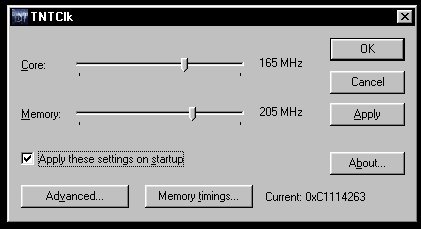
Some drivers (such as Hercules Dynamite TNT drivers, and the Creative Labs Beta drivers) have overclocking utilities built in. For everyone, I recommend TNTClk for overclocking. It works well, and can apply the settings on startup. It also lets you overclock pretty high, depending on what card (TNT or TNT2) you have.
To download TNTClk, click here (48.6 KB). Upon start-up, this program should display the current speed of your card and display sliders which will allow you to adjust the speed. Ignore Advanced and Memory timings. We will add more about these later.

| Cooling | Core Speed | Memory Speed |
| Heatsink | 95 MHz - 110 MHz | 110 MHz - 120 MHz |
| Heatsink + good fan | 110 MHz - 115 MHz | 110 MHz - 120 MHz |
| The Card Cooler or large fans | 110 MHz - 120 MHz | 110 MHz - 125 MHz |
| TennMax or similar cooler | 115 MHz - 125 MHz | 115 MHz - 125 MHz |
| Peltier+ | 115 MHz - 135 MHz | 120 MHz - 135 MHz |