How to Make a PC Quieter (Page 2/5)
Posted: January 20, 2000
Written by: Dan "Tweak Monkey" Kennedy
Stage 1: Shut The FANS Up!
Inside your case there are most likely at least three fans. I'm willing to bet your video card has one, your CPU definitely has one, and your power supply has one. Many CPU heatsink/fans come with multiple fans, and even many power supplies have two fans. This doesn't even account for any extra fans you have inside your case to circulate air or to cool hard drives.
There are a lot of them, but the fans are among the easiest beasts to tame, because they're the least technical. Some fans use sleeve bearings and most others use ball bearings, but since both involve blades spinning at several thousand RPMs, they are noisy.
The Secret: Lube!
Whether it's motor oil, silicone lubricant, or petroleum jelly (if you didn't eat it all, again), a little lube goes a long way in mechanics. The steps to lubricate a fan are very easy. It will almost definitely shut up an older fan, and could even quiet down a new fan. So, how's it done?
1) Shut Down the PC
Since you'll be working inside the case, you might as well shut down the PC first.
2) Locate the Fans
Find the fan you want to lube up first...
3) Remove the Sticker
Most fans have a sticker covering the area you'll need to lube up. The other side is often a solid plastic piece.
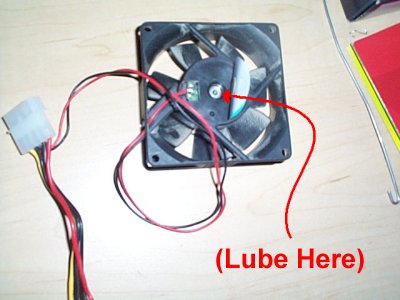
The sticker should easily come off. If not, pull it from an edge.
4) Lube Away
If you have a lubricant made for this purpose it would probably work best. Otherwise, a drop of clean motor oil or a smudge of chassis grease will work perfect. Don't put too much in there... a single drop should do the trick.
A good mechanic always tastes oil before use. Hey... that isn't Mobil 1! (Don't drink oil without adult supervision)
5) Turn it By Hand
Before you turn on your PC and the fan blasts around at high RPMs, you'll want to rotate the fan a few times to make sure it works into the mechanism. Wipe up any excess oil. If the sticker can be replaced, go for it. If you got oil on the surface where it was sticking, it probably will not re-stick. It's not a problem, though. Either throw it away or cover it up with a piece of tape to keep the grease in and the dust out.
Now... move onto the next fan until you've finished. But hey, let's not stop there... we've got quite a few more tips.
Next Page