How To Setup a LAN Party (Page 4/4)
Posted: August 10, 2000
Written by: Dan "Tweak Monkey" Kennedy
Troubleshooting
Your first couple of LAN parties may not be so successful, but don't worry, things will get better over time. Here are some solutions to the more common problems:
-Someone isn't showing up on the network or can't connect to games: This is usually easy to fix. Make sure their IP address is setup correctly and they are in the same workgroup (for simplicity!) as outlined earlier in the guide. If the IP is correct, make sure nobody else on the network has the same IP. If they're still having problems, go into Network Neighborhood and type the person's name that isn't showing up like this in the address bar: \\name. For example, you would type \\Tweak3D if the login name was Tweak3D. This should show if any devices are shared and/or if it was connected right. If that doesn't work, check to ensure that the cables are connected to both the hub/switch and the NIC (network interface card) in the PC. Make sure the right protocols are installed (you'll probably use TCP/IP and maybe IPX). Hit refresh a couple of times in Network Neighborhood, or wait a bit then hit refresh again. Sometimes it takes a while for PCs to recognize the others.
-Blue Screen of Death: Sometimes it happens, and it seems to happen more frequently at LAN parties. Usually this can be fixed by going into Windows Safe Mode (reboot, hit F5 after the BIOS information screen). Once in Safe Mode, right click My Computer, and choose Properties. Go to Device Manager and delete any hardware that shows up twice. Then reboot and it may have fixed some problems. Re-installing Windows may not be too far off.. :(
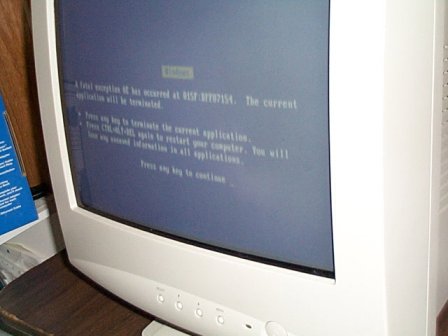
Mike is plagued by the evil Blue Screen of Death!
-Fatigue, illness, and/or death: Take breaks periodically (usually between games) to let your hands and head take a break. Too much gaming will make you tired, or sick, or maybe even kill you (after long periods of time, of course ;)). For best results, drink some water or something during breaks to wash all that junk food you've likely had.
Conclusion
Setting up a LAN party is a big job, but the work is well worth it! Remember to keep the games and atmosphere fresh and unique to keep your LAN party popular and enjoyable. If you have any suggestions, comments, or you'd like to share some LAN party stories, I'd like to hear them. Thanks for reading!
Want to print this guide? Check out the:
Printer Friendly Version
First Page