Half-Life v1.1 Tweak Guide (Page 5/7)
Posted: June 10, 2000
Written by: Ryan "Xero" Martinez
Tweaking the New Netcode (Client, cont.)
cl_allowdownload X - This controls whether or not your computer will download any files (whether that be maps or logos) from the server. If the server changes to a map you don't have (which is common), you will be kicked off. Leaving this to 1 (the default) is highly recommended.
cl_download_ingame X - By setting this to 0, your client will not download new logos and so on as people join the server while you play. This can save you a lot of pain if you're a modem user with a poor connection. If logo downloading has ever caused you undue stress, disable this for wonderful relief. It will still download maps and extra files in between games as they are needed, however. 1 is the default.
Enabling & Reading the Netgraph
The netgraph (aka Lagometer for Q3 fans) in Half-Life has returned once again, retuned and refined to suit the new netcode. The netgraph can feed you useful information on your up/downstream bandwidth usage, ping, packetloss, framerate, network stability, and so on. To enable it, open your console, and type net_graph 1. This will enable a small display in the lower right corner of your screen telling you all sorts of info about your connection:
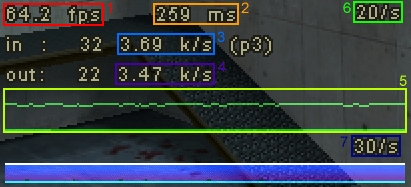
1. FPS Counter - Your current frame rate.
2. Network Latency - This is your current network latency. Unlike the Ping display on the game scoreboard, this readout does not count rendering & timing latencies into the number.
3. Your downstream bandwidth use.
4. Your upstream bandwidth use.
5. This is an animated graph displaying your ever-changing ping. The higher your ping, the thicker this graph gets. This also displays your lost packets in red.
6. Your current server update (incoming) rate.
7. Your current client update (outgoing) rate.
You can change the netgraph's position with the CVAR net_graphpos. Setting net_graphpos to 1, 2, or 3 will place the netgraph in the bottom right, center, or left section of the screen respectively. To change the width of the netgraph, use the CVAR net_graphwidth, which defaults to 192. You can change the graph's default height of 64 pixels by the CVAR graphheight.
Important Note: The new netgraph creates quite a drain on framerates. It's important that this be turned off when you're not testing your connection. If you prefer it turned on, decreasing its size can improve framerates drastically when it is on.
Next Page