GeForce 256 Tweak Guide (Page 4/6)
Posted: March 7, 2000
Written by: Dan "Tweak Monkey" Kennedy
Registry Tweaks!
Before you mess around with these settings, a tweak should be applied that will enable all of the hidden options in the tweaking program. I didn't need to edit this value, but some people will probably need to. Open up regedit (Start, run, regedit), and navigate to HKEY_LOCAL_MACHINE\Software\NVIDIA Corporation\Global\NVTweak. Create a DWORD value called "CoolBits" and set its value to 3. Or you can download this file and run it. Double click the file and choose "Yes".
New Registry Tweaks
The following are the tweaks that were discovered since the original posting of this guide (thanks Nvidia!):
"EnableIrongate2x" - This registry string should enable AGP2X mode for AMD Athlon systems. If it works, this should increase performance. If it doesn't work, it may cause problems. The exact string for this value is:
[HKEY_LOCAL_MACHINE\Software\NVIDIA Corporation\Global\System]
"EnableIrongate2x"=dword:00000001
Either enter this string manually, or download this .reg file and run it. If you want to undo the settings, either download this file and run it, or delete the DWORD value specified above.
"ReqAGPFW" - This registry string should enable AGP Fast Writes. Fast Writes allow data to be transferred over the AGP bus with almost no latency, avoiding the system memory by sending data directly do the GeForce from the CPU (see page 8 of the GeForce 256 Preview for diagrams and info). However, this has yet to be used successfully by most people. If you want to try to use it, here's the value:
[HKEY_LOCAL_MACHINE\Software\NVIDIA Corporation\Global\System]
"ReqAGPFW"=dword:00000001
Enter this string manually, or download this .reg file and run it. If you want to undo the settings, either download this file and run it, or delete the DWORD value specified above.
"DoIOToFlushCache" - According to a Kevin Harris (thanks Kevin!), this will turn on the option to disable VSYNC. Since this is already part of the Nvidia display settings (or at least, it should be), you probably don't need it. If you do want to use it, here's the full string:
[HKEY_LOCAL_MACHINE\Software\NVIDIA Corporation\Global\System]
"DoIOToFlushCache"=dword:00000001
Download a .reg file here to enable it, or a .reg file here to disable it.
"ReqAGPRate" - To be honest, I still don't know what this does. "AGP rate" is what it looks like, but honestly, I couldn't find a practical purpose for this string. I tried it on my Pentium II system but I saw no improvements. Here's the full string:
[HKEY_LOCAL_MACHINE\Software\NVIDIA Corporation\Global\System]
"ReqAGPRate"=dword:00000001
Download a .reg file here to enable it or here to disable it.
"EnableIrongateSBA" - One other setting that recieved a lot of attention is EnableIrongateSBA. As the name suggests, this enables Irongate Sideband Addressing. As with the other "Irongate" setting, this appears to only work with Athlon systems. A lot of readers let me know that this tweak also only works with reference drivers v3.69+. Enable this setting for performance. It may possibly lead to problems, though. Here's the full string:
[HKEY_LOCAL_MACHINE\Software\NVIDIA Corporation\Global\System]
"EnableIrongateSBA"=dword:00000001
Download a .reg file here to enable, or download this .reg file to undo it if you have problems.
Remember, if any of the settings above give you problems, you can simply run the undo file or delete the DWORD value(s). Use the tweaks ONE AT A TIME (and test with games after each tweak) to avoid complications.
Display Settings
To access the display settings tweaks, right click your desktop and choose Properties. Click the Settings tab at the top, then the Advanced button. Click the GeForce tab at the top. It should display information about your video card.
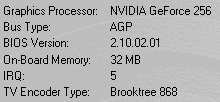
Click Additional Properties at the bottom. It will bring up a menu with several tabs that are all for tweakers.
Color correction and brightness
You should probably start in the Color Correction tab. If you've got problems with games or your desktop being too bright/dark, adjust these values. You can apply more color/brightness tweaks in the Overlay Color Control tab.
Direct3D Settings
Next, head over to the Direct3D tab. Keep in mind that most non-first person shooter games use Direct3D, so these settings will directly affect all of them.
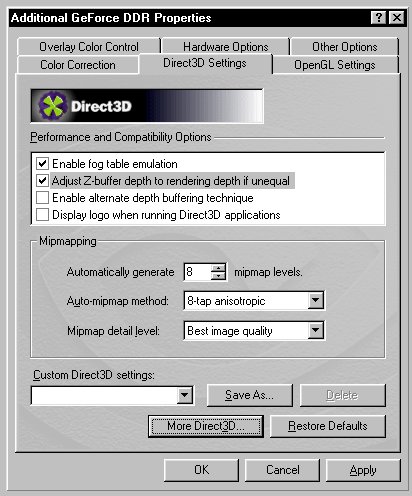
Enable fog table emulation - Since some games that don't use Direct3D's fog correctly, this option should be enabled for compatibility. It won't affect performance much, if at all.
Adjust Z-Buffer depth to rendering depth if unequal - This won't matter much but should probably be left enabled.
Enable alternate depth buffering technique - This will improve the quality of 16-bit 3D rendering, but it will slow things down. Our tests showed some slow downs in Direct3D without any significant image quality improvements. This is best left disabled.
Display Logo when running Direct3D applications - There is no practical reason to enable this, unless you actually want to see the Nvidia logo in the corner of the screen when running Direct3D games, etc. Note that even if this is enabled, games can override this feature.
Automatically generate x mipmap levels - This value can be set from 0 to 12, and it's best to leave it high unless you experience problems with Direct3D games. Mipmaps increase the efficiency of texture transfers across the bus. I set it to 0 if I see problems in a game, but usually I keep this at 8.
Auto-mipmap method - If you have the mipmap levels set to 0, this is irrelevent, but if you are using mipmaps, this can boost speed or visuals. Bilinear filtering looks pretty good and it runs quite a bit faster than 8-tap anisotropic filtering. Overall, anistropic filtering can provide much more smooth filtering. Only use anisotropic if you have extra performance to spare (which with the GeForce 256, is probably the case). Keep in mind this is ONLY for Direct3D, so it won't affect Quake 3 Arena or other OpenGL games.
Mipmap detail level - This option obviously lets you choose the detail of the mipmaps mentioned above. Five options are available, each of which sacrifices either image quality for performance or vice-versa. I recommend using "Best image quality" with the GeForce 256 unless you have a slow CPU (less than 233 MHz).
Click More Direct3D at the bottom to access more features.
Texel Alignment - Leave this feature alone. The GeForce 256 is extremely accurate and therefore you probably won't see many seams in textures. If you do, it's probably the fault of the software. Adjusting this value may drop the frame rate significantly.
PCI Texture Memory Size - Set this to 0, since the GeForce 256 is AGP only at this time (PCI should be coming soon!). Exceptions? Your GeForce should be running in pure AGP GC-MMP AGP Pipelining Mode rather than GC-MMF AGP Frame Mode. If the performance is poor with PCI Texture Memory Size set to 0, consider upgrading your drivers or set this value higher. Thanks Heat for the info.
Disable vertical sync (VSYNC) - If you check this box and disable VSYNC, games will run a bit faster because the frame rate won't be limited to the refresh rate. However, this also can lead to tearing due to the lack of synchronization. It's usually okay to check this box. Set the frames ahead to 5 to start (which I believe is default). If the input (mouse or keyboard, etc.) of games tends to lag, lower this value.
Next Page