Air Cooling Guide (Page 5/7)
Posted: November 27, 2000
Written by: Tuan "Solace" Nguyen
Fitting and Modifying
Since high-speed processors these days are socket based, it’s ironic that they are usually packaged with a heatsink half the size of slower slot-based processors. You’d figure that manufacturers would produce heatsinks at least the same size as the slots heatsinks, but they don’t. I recommend that if your motherboard has the room, and you have the tools, go out and get a slot heatsink, trim it down a bit and modify the clip to fit on a socket based motherboard. As a matter of fact, this is exactly what I did with my heatsink. My main system uses an Asus A7V motherboard -- which has an unusual amount of heatsink room, so I decided to take advantage of it. I purchased the Alpha P3125 and modified it to fit perfectly on the motherboard. A clip from another heatsink was used to attach it to the socket. This heatsink accommodates two 60mm fans, more airflow than you’ll ever need. Let’s get on with some fan fare.
CPU Fan Placement
Knowing where to place fans inside your computer is almost as important as having a case to put them in. The same thing goes for a CPU fan. You really shouldn’t just slap a fan on a heatsink and expect good performance. The following is a diagram showing a typical heatsink design.
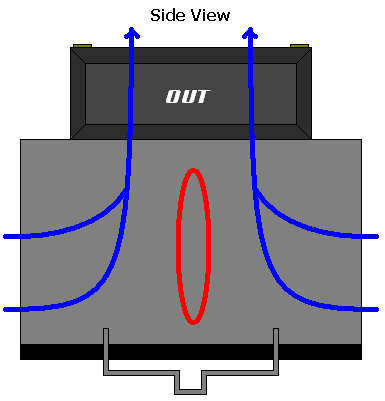
A Standard HSF (Heatsink/Fan Combo)
The red oval indicates an area where there is low air circulation. You maybe asking, “well shouldn’t there be air moving since the fan is right on top of that area?” The answer is no. This is because there isn’t any airflow in the center of the fan. Think of a tornado. At the center of the tornado, called the eye, the air is hardly moving. You can actually stand inside the eye and be fine. This is the case for a fan. All of the air movement occurs in a ring surrounding the center.
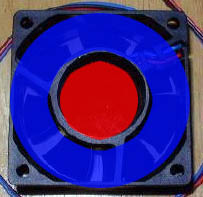
Airflow Layout
Above is a picture of a typical fan. The red spot is where the dead spot is. The air in this area is relatively inert, moving very little. The area in blue is where the action really occurs. Now, you may have noticed that people have their fans centered directly over their CPU heatsinks. If the CPU core is directly in the center of the heatsink, it really is ineffective to have a dead spot directly above that area. For this reason, you should try to position your fans slightly off center so that the fins of the fan affect the center of the heatsink -- where the most heat is.
If you’re using a Slot heatsink, then I suggest having two fans. This way, you get the best airflow where it’s most needed.
Next Page