How to Eliminate Spyware, Adware, and Random Popups (Page 4 of 5)
Posted: January 2, 2003
Written By: Dan "Tweak Monkey" Kennedy
Removing Spyware and Adware
First, go to ad-aware.com and download Ad-Aware from Lavasoft. Install it and run it. Check the "My Computer" box on the left to select every option for scanning. Then choose "Scan Now". This program will eliminate just about every Spyware/Adware program you'll encounter, so it's a good tool to keep around. It will even remove Spyware that was uninstalled a long time ago. It will also remove advertising cookies. It is a good idea to back-up your files (the program includes a back-up utility) before you remove them.
Of course, after it's done its job you could always uninstall the program, but you might want to download it again later. I recommend checking for Adware once a month (minimum) in order to stay clean or again whenever your PC seems slow.
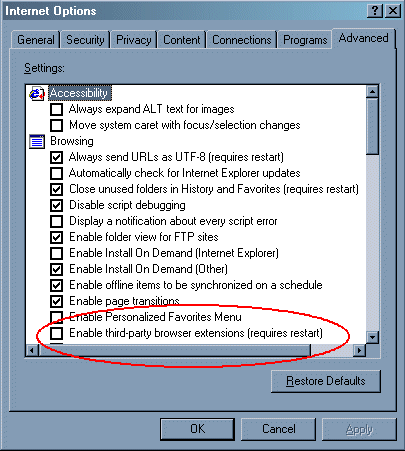
Second, disable 3rd party browser extensions in Internet Explorer. This will prevent some Spyware from contaminating your PC in the future and stop those annoying Gator and New.Net shell extensions from taking over.
To do this, start up Internet Explorer and go to the "Tools" tab at the top. Then choose "Internet Options". Move to the "Advanced Tab" at the right. Uncheck the box "Enable third-party browser extensions (requires restart)". Choose OK until you're out of this menu. Don't restart until you're done with this guide, though, as you'll need to restart again anyway.
Third, choose "Start", "Run", and type "msconfig". Hit OK. Move to the "Startup" tab.

This is the list of programs that launch when Windows starts. Scroll through your list and be sure there aren't any extra programs you don't want to run, such as Gator or those mentioned earlier. I also turned off "qttask" (Quicktime's taskbar component) and "ADGJET" (some Sound Blaster Live utility). Once you're finished here, choose OK and then "Exit without restart".
Finally, enter the registry editor ("Start","Run", "Regedit", OK). Navigate to HKEY_LOCAL_MACHINE / SOFTWARE / Microsoft / Windows / CurrentVersion / Run. Here are the programs set to run when Windows starts. This list should be basically the same as the MSCONFIG list we just saw. If you see any additional programs that appear to be out of the ordinary, delete the entry (backup first!) and close the registry editor.
Next Page