Pixel and Vertex Shading (Page 3/9)
Posted: February 25, 2001
Written by: Tuan "Solace" Nguyen
Pixel Shading
With the advent of the GeForce2 and the NSR, NVIDIA introduced a better method than EMBM to increase details on objects in a game. Since every game that goes through the graphics pipeline must eventually end up as pixels, NVIDIA sought to increase detail but individually manipulating each pixel.
What is per-pixel shading? It's a method of applying special rendering effects... per pixel. It allows material and real world effects to be applied individually to a pixel for more accuracy and intensity. Per-pixel shading will redefine the visual look and feel of imagery for PC graphics. Per-pixel shading has long been used in film production to create a more realistic and lifelike appearance for computer generated imagery. If you've seen Toy Story, you'll definitely remember Buzz Light-year. Remember the translucent reflection on Buzz's helmet? How the environment and light streaks reflected off the glass but also let the image underneath show through? That was done with per-pixel shading. Until now, it wasn't practical to use per-pixel shading on a PC because of the intense power and processing requirements needed. Sure, you could have done that in 3D Studio but could you have done it in real-time? Could the effect be applied to an entire frame at high resolution in 1/60th of a second? Not until now.
Per-pixel shading is useful for simulating natural phenomena and accurate surface attributes such as fur, cloth, metals, glass, rock, and other highly detailed surfaces.
Traditionally, effects were done on an entire triangle and sometimes an entire texture using a technique called interpolation. Special effects were done using calculations based on the vertices of the triangle and interpolating the entire area from the vertices. The end result is a generalized visual appearance… like an estimate or approximation of the final image. The key benefit of using interpolation is that it is fast and easy to apply. But, the downside to it is that with large triangles, the resulting image contains artifacts, which degrades overall image accuracy and quality.
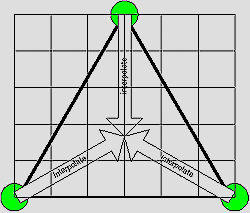

Using per-pixel shading, effects and calculations are applied to individual pixels. Since the triangle will be composed of many pixels, the resulting image is highly accurate in representing what the image was intended to be. Let’s assume that a generic triangle is drawn together (including its area) using 100 pixels. Now, we also have a effect pallet of 10 effects. Each pixel then, can accept any one of the ten that are available. That’s an outcome of 10,000 different possible effects just for that one triangle. If interpolation was used, than the effect is fixed using that one out of ten effects and generalized across the entire triangle. Below is a visual comparison between interpolation and per-pixel shading.
Next Page